
Quick answer
CatrinaBet support is requested inside the app, in the Self-service Center: you choose your question, send the request with your details and follow its status in “Consulta de Progreso” (Progress Check). The app also shows a floating support button. catrinabet.mx does not provide account support.
Channels
How do I contact CatrinaBet support?
From the app: the Self-service Center or the floating support button.
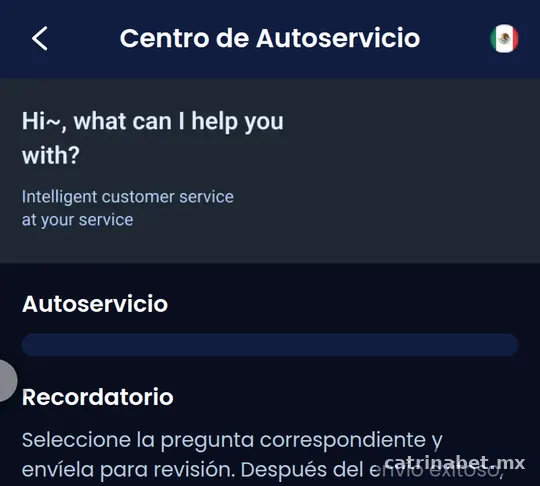
At our review, the Centro de Autoservicio (Self-service Center) had the options Autoservicio (Self-service), Recordatorio (Reminder) and Consulta de Progreso (Progress Check). The process is: you choose the question type, fill in the request, a specialist reviews it and you check progress.
The app also shows a floating support button on screen. Use it for general questions; for deposits or withdrawals, a Self-service Center request leaves a record you can follow.
Steps
How do you send a request step by step?
Choose the question, attach what you are asked for and keep the tracking number.
- Log in and open the Centro de Autoservicio in the app.
- Tap Autoservicio and pick the question that matches your case.
- Fill in the details: order number, amount, date and a short explanation.
- Attach screenshots or receipts if asked.
- Send the request; a specialist will review it.
- Follow its status under Consulta de Progreso.
Details
Which details should you prepare?
The order number, amount, time and receipt, depending on the problem.
| Problem | Details to prepare |
|---|---|
| Deposit not showing | Order number, exact amount, payment channel, time and receipt |
| Withdrawal not received | Withdrawal order number, amount, time and payout account details |
| Account access | Registered mobile number and a description of the error |
| Game or bet | Game name, period or ticket number and a screenshot |
| Promotion | Activity name, date and a screenshot of the screen |
For specific cases, see deposit not showing and withdrawal not received.
Tracking
What are “Consulta de Progreso” and “Recordatorio”?
Progress Check shows the status of your requests; Reminder collects notices about them.
After sending a request, open Consulta de Progreso to see whether it is pending, under review or resolved. Related notices may appear under Recordatorio. Check both before sending the same request again: duplicates do not speed up the reply.
We do not publish response times because the app does not state them and they depend on each case.
Writing
How do you write a request that gets solved quickly?
One request per problem, with exact details and a two or three-line explanation.
A good example: “On 12 October at 20:15 I made a MX$300 deposit through channel X. The order number is 12345. My bank shows the payment as completed, but it is not in my balance. Receipt attached.”
| Include | Avoid |
|---|---|
| Approximate date and time | Messages like “nothing arrived” |
| Exact amount and order number | Several identical requests |
| Receipt or screenshot | Full card details or passwords |
| What you expected to happen | Abusive language, which slows things down |
Keep a screenshot of the request you sent. If you need to follow up, reply in the same case instead of opening a new one.
Safety
How do you avoid fake “support” scams?
Real support is inside the app; nobody legitimate will ask for your password or code.
- Do not reply to social media profiles claiming to be “CatrinaBet support”.
- Never share your password or verification code.
- Do not pay “fees” outside the app to release a withdrawal.
- Do not install files sent to you by chat.
- If you shared details, change your password with forgot password.
Can catrinabet.mx help with my account?
No. We are an independent guide; we have no access to accounts, balances or withdrawals.
We can help with questions about this guide or outdated information through our contact page. For anything about your account, use the Self-service Center in the app.
Support FAQ
How do I contact CatrinaBet support?
Through the Self-service Center in the app or the floating support button.
What is the Self-service Center?
The section of the app where you choose your question, send a request and follow its status.
Where can I see the status of my request?
Under Consulta de Progreso, inside the Self-service Center.
How long does support take to reply?
The app does not publish a time; it depends on the case.
Can support ask for my password?
No. Never share your password or verification code.
Is catrinabet.mx CatrinaBet support?
No. We are an independent guide with no access to accounts.
What should I attach for a deposit?
Order number, amount, channel, time and payment receipt.
Can I send several requests about the same problem?
It is better not to. Reply within the same case so the review is not duplicated.
Key takeaways
- Support is in the app: Self-service Center and floating button.
- Prepare the order number, amount, time and receipt.
- Follow your case under Consulta de Progreso.
- Adults 18+ only. catrinabet.mx is an independent guide: it does not handle accounts or money. Details can change; always confirm inside the app.
See more topics from the home page of this guide.