
Quick answer
If your CatrinaBet deposit does not show in your balance, check the deposit history, confirm you paid the exact amount through the channel and order you created, and keep your receipt. If the payment left your bank and is not showing, send a Self-service Center request with the order number and receipt.
Causes
Why is my deposit not showing?
Most often the payment is still processing, the amount does not match or a different order was paid.
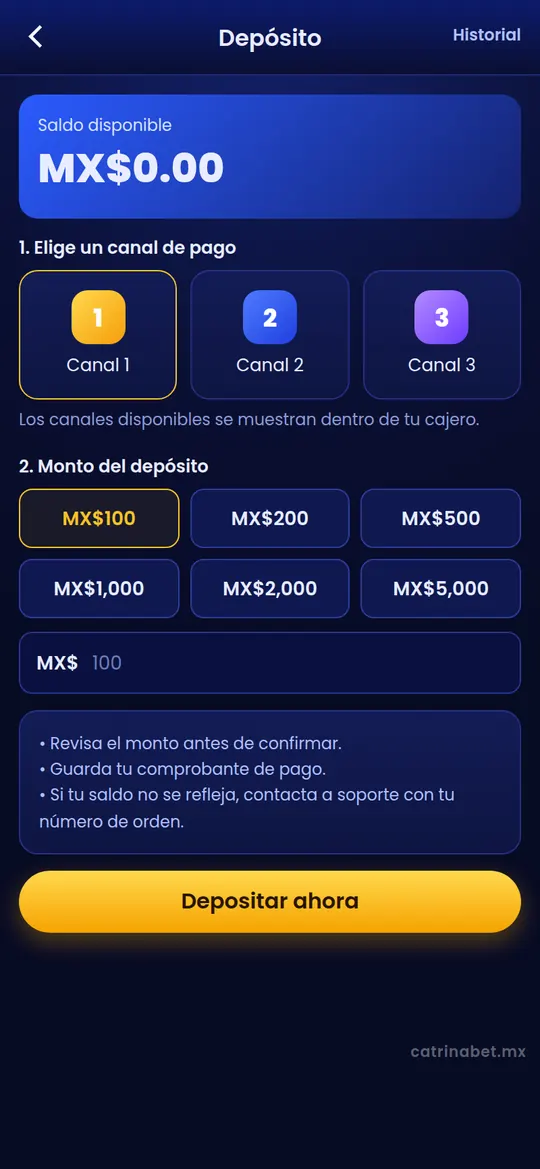
When you deposit from Billetera › Depósito (Wallet › Deposit), the platform creates an order with an amount and a payment channel. The balance is credited when the channel confirms payment of that order.
If you paid a different amount, used an expired order or paid the same order twice, crediting can fail or be delayed. The general CatrinaBet deposit guide explains the full process.
Checks
What should you check first?
The deposit history, the exact amount, the order used and whether your bank charged you.
- Open Billetera › Depósito and find the deposit history.
- Locate the order and note its number, amount, channel and time.
- Compare the amount with what you paid: it must be identical.
- Check in your bank or payment app whether the charge shows as completed.
- Keep the receipt (screenshot or PDF) with the payment reference.
Statuses
What do the deposit statuses mean?
Pending: wait; failed or cancelled: not charged or not completed; successful: check your balance.
| Status (approximate name) | What it means | What to do |
|---|---|---|
| Pending | The platform is waiting for the channel to confirm | Wait; do not pay the same order again |
| Successful | The deposit was credited | Check your balance; refresh the app if you cannot see it |
| Failed / Cancelled | The order was not completed | Check whether your bank charged you; if so, contact support |
| Expired | The time to pay the order ran out | Create a new order; do not pay the expired one |
The exact status names may differ in the app.
Prevention
How do you stop a deposit from failing?
Pay the exact amount, within the order time and from an account in your name.
| Do | Avoid |
|---|---|
| Paying exactly the order amount | Rounding or changing the amount |
| Paying before the order expires | Using an old order |
| Using an account or method in your name | Paying from third-party accounts |
| Keeping the receipt | Deleting the payment reference |
| Creating one order per payment | Paying the same order twice |
Support
How do you ask for help with a deposit?
Send a request with the order number, amount, channel, time and receipt.
Open the Self-service Center, choose the deposit question and attach the receipt. Follow the case under Consulta de Progreso and do not open several requests for the same payment. The steps are in the CatrinaBet support guide.
We do not publish crediting times because the app does not set them and they depend on the channel.
Waiting
What should you do while waiting for a reply?
Do not pay again, keep everything and check your case under Consulta de Progreso.
- Check the deposit history now and then, not every minute.
- Reply within the same case if support asks for more details.
- Do not play with money meant for something else while you wait.
- If your bank offers a dispute process, also keep that reference number.
If the payment never left your bank, there is nothing to credit: create a new order only if you still want to deposit.
Precautions
What should you not do?
Do not pay again “just in case”, do not share bank details by chat and do not follow fake agents.
- Do not pay twice hoping one will be credited.
- Do not send full card details, PINs or passwords.
- Do not follow social media accounts that pose as support.
- Only deposit what you are prepared to lose.
If gaming stops feeling like entertainment, stop and look for support. In Mexico you can call the free Línea de la Vida helpline on 800 911 2000.
Deposit not showing FAQ
Why is my CatrinaBet deposit not showing?
It may still be pending, the amount may not match or an expired order was paid. Check the history.
How long does a deposit take to show?
The app does not show a fixed time; it depends on the payment channel.
My bank charged me but I have no balance, what should I do?
Keep the receipt and send a request with the order number to the Self-service Center.
Can I pay the same order again?
No. If an order has expired, create a new one.
Which receipt do I need?
A screenshot or PDF of the payment showing amount, date, time and reference.
Which deposit channels are there?
The available channels are shown in your cashier and can change.
Can someone credit my deposit outside the app?
No. Only the in-app support handles deposits.
Key takeaways
- Check the history and the order status.
- The amount paid must match the order exactly.
- Keep the receipt and send a single request.
- Adults 18+ only. catrinabet.mx is an independent guide: it does not handle accounts or money. Details can change; always confirm inside the app.
See the rest of the topics on catrinabet.mx, the independent guide.