
Quick answer
The CatrinaBet invitation code is the identifier that links a new account to the person who invited it. You type it in the sign-up form (or it is already filled in if you register from an invite link). Your own code and link are in the Ganar (Earn) section of the app.
Definition
What is the invitation code?
It is the reference that places your account in the team of whoever invited you, for their rewards programme.
CatrinaBet runs an invite programme in which each user can invite other people. To know who invited whom, every account has an invitation code and link.
When someone signs up with your code, they join your team. Depending on the team’s activity, the programme shows tiered rewards. We explain it in full in inviting friends on CatrinaBet.
Using a code is optional when you sign up. If nobody invited you, leave the field empty.
Sign-up
Where do you enter the code when signing up?
In the sign-up form, in the invitation code field, before tapping Register.
- Open the CatrinaBet sign-up screen.
- Enter your Mexican mobile number (+52) and create your password.
- In the invitation code field, type the code you were given.
- Check it is spelled correctly, with no spaces.
- Complete the sign-up.
If you arrive from an invite link, the code is usually already filled in. Check it before continuing. For the rest of the process, see the CatrinaBet registration guide.
Your code
Where do you find your own code and link?
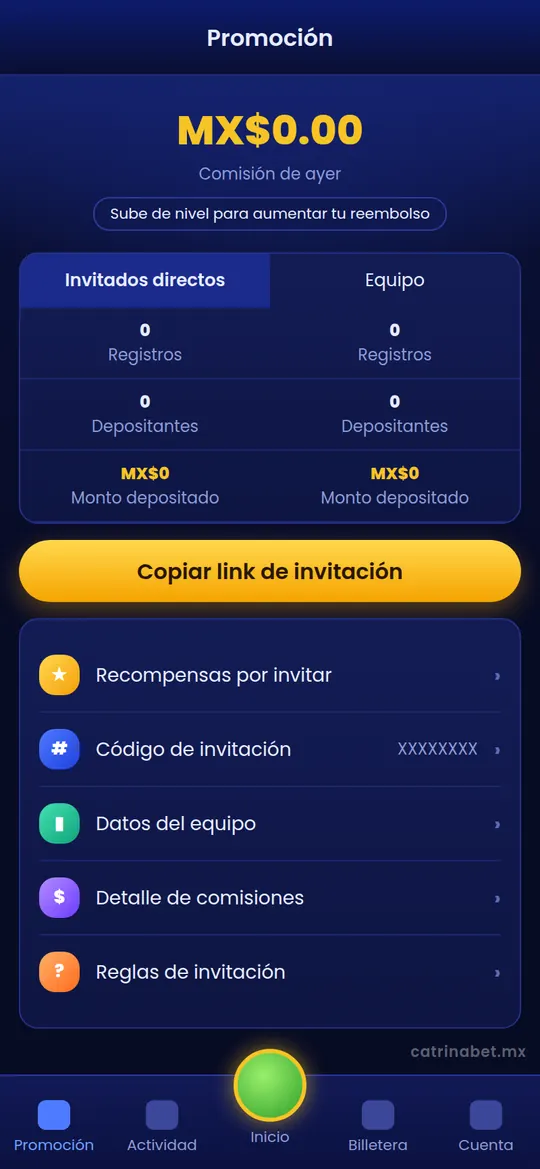
In the Ganar (Earn) section of the bottom bar, where your invite rewards are.
In October 2026 the app’s bottom bar had five buttons: Ganar (Earn), Promoción (Promotion), Inicio (Home), Billetera (Wallet) and Cuenta (Account). The invite programme moved to Ganar, which has three tabs:
| Tab | What it shows |
|---|---|
| Mis premios (My rewards) | Your total and today’s rewards, and the Recompensas por retiro (withdrawal rewards) area with Reclamar (Claim) and Detalle (Details) buttons |
| Premios por invitar (Invite rewards) | Your link and code to share and your team data |
| Reglas (Rules) | The current programme conditions |
These screens show when you are logged in. This information used to be in the Promoción section; if you use an older version of the app, look there.
Mistakes
What if you forgot to enter the code when signing up?
The code can usually only be added when the account is created; ask support if it was a mistake.
On most platforms of this kind, the link to whoever invited you is fixed at sign-up and cannot be changed later. If you registered without the code by mistake, say so in a Self-service Center request and ask whether it can be corrected. We explain how in the CatrinaBet support guide.
Do not create a second account to use the code: the rules of these platforms usually ban multiple accounts per person, and you could lose access to both.
Checking
How can you check the code was applied?
The person who invited you can see you in their team data; you can ask them or check with support.
After sign-up, the person who invited you should see a new member under Ganar › Premios por invitar. If you do not show up after a reasonable time, check together that the code was correct.
The most common errors are a swapped letter or number, a trailing space or signing up from a different link from the one shared. If that happened, send a request with your mobile number and the code that should have been applied.
Good practice
How do you share your code responsibly?
Only with adults who want to sign up, without promises of winnings.
- Share only with people aged 18 or over.
- Do not promise winnings or “safe methods”.
- Explain that gaming carries risk and that they should set a limit.
- Do not post your code where minors can see it.
- Never share your password or your account verification code.
Comparison
Invitation code or gift code?
They are different: one links accounts, the other redeems a reward.
| Invitation code | Gift code | |
|---|---|---|
| What it is for | Joining the team of whoever invited you | Redeeming a one-off reward, if one is active |
| When it is used | At sign-up | Later, from the promotions section |
| Who gives it | Another user | The platform, through its channels |
See which promotions were active in the CatrinaBet promotions guide.
Invitation code FAQ
Do I have to use an invitation code?
No. You can sign up without one.
Where do I enter the invitation code?
In the code field of the sign-up form, before you complete it.
Where can I see my invitation code?
In the Ganar section, Premios por invitar tab, while logged in.
Can I add the code after signing up?
Usually not. If it was a mistake, ask support through the Self-service Center.
What do I get if someone uses my code?
The programme shows tiered rewards based on your team’s activity; check the Reglas tab for the current conditions.
Are the link and the code the same thing?
They do the same job: the link has your code built in.
Can I use my own code on another account?
We do not recommend it: the rules usually ban multiple accounts per person.
Key takeaways
- The code links your account to whoever invited you.
- You enter it at sign-up; the link includes it.
- Your code is under Ganar › Premios por invitar.
- Adults 18+ only. catrinabet.mx is an independent guide: it does not handle accounts or money. Details can change; always confirm inside the app.
More topics in the CatrinaBet guide for Mexico.